
hide.me DNS and WebRTC leak test: what we saw
A screen recording of a DNS leak test and a BrowserLeaks WebRTC result with hide.me connected, and how the other VPNs in the session compare.
- DNS: resolvers via the VPN
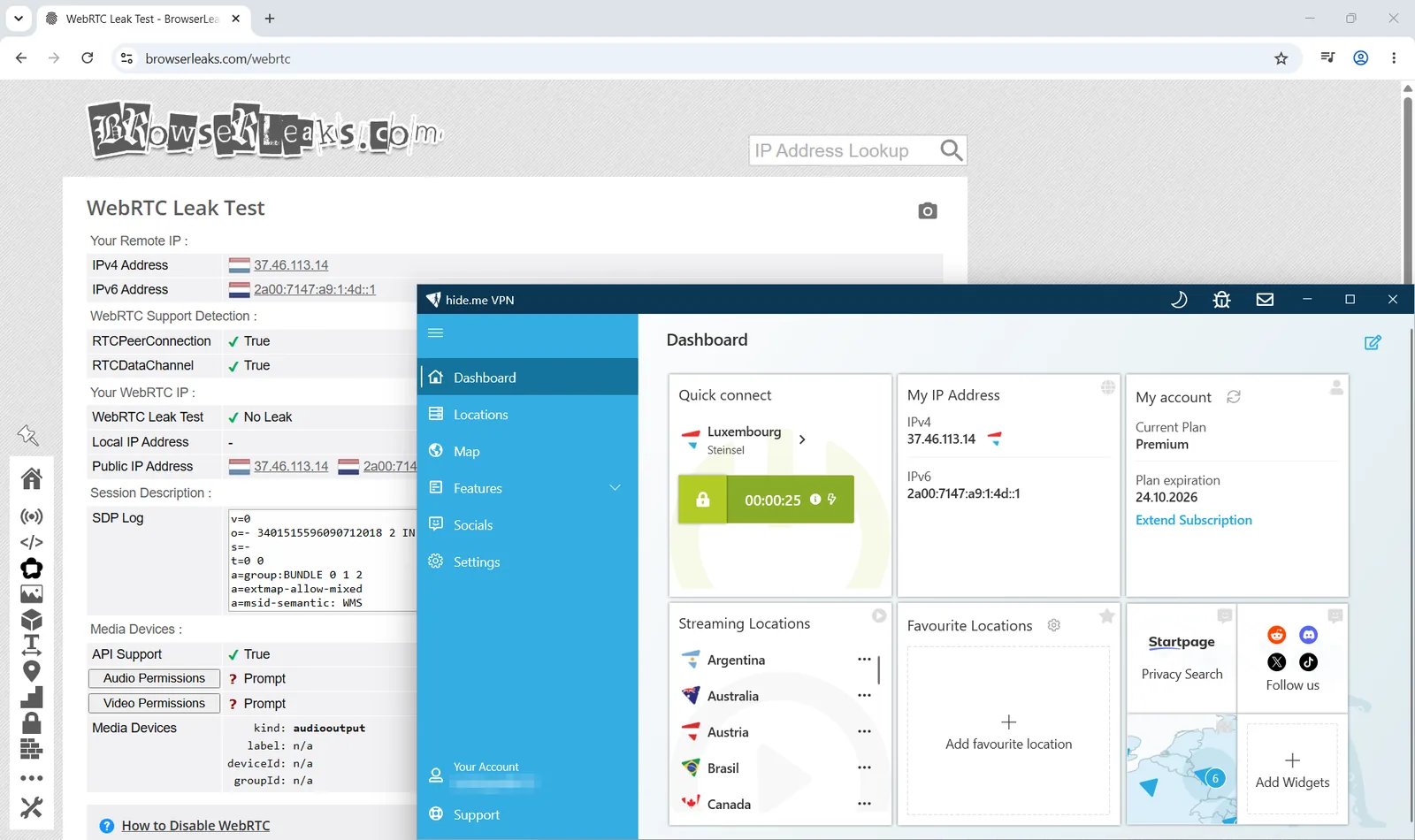
- WebRTC: No Leak
DNS leak test
A DNS leak test run while hide.me was connected to Luxembourg.
WebRTC leak test
BrowserLeaks WebRTC test, same session.
The other VPNs in this session
Every VPN got the same two checks; one capture is missing and is marked as such.
| VPN | DNS leak test | WebRTC leak test |
|---|---|---|
| hide.me this site | captured, no leak seen | captured, no leak seen |
| Windscribe | captured, no leak seen | captured, no leak seen |
| PrivadoVPN | captured, no leak seen | captured, no leak seen |
| LetsVPN | captured, no leak seen | captured, no leak seen |
| CyberGhost | captured, no leak seen | captured, no leak seen |
| PureVPN | captured, no leak seen | captured, no leak seen |
| AdGuard VPN | captured, no leak seen | captured, no leak seen |
| NordVPN | captured, no leak seen | captured, no leak seen |
| ExpressVPN | captured, no leak seen | not captured |
| Surfshark | captured, no leak seen | captured, no leak seen |
| Proton VPN | captured, no leak seen | captured, no leak seen |
What a clean result means (and does not)
A clean DNS and WebRTC result is the minimum, not the whole story.
- It means that in this capture your provider's resolvers and your real IP did not show up.
- It does not prove the VPN keeps no logs, and it does not test IPv6 or the kill switch.
- Re-test after changing apps, browsers or networks: leaks usually come from configuration changes.
Questions people ask
Short answers, based on our own captures and the data on this site.
Does hide.me leak DNS or WebRTC?
Not in our captures: with hide.me connected, the DNS test showed resolvers reached through the VPN and the WebRTC test reported no leak with only the VPN-facing address visible. One test on one day cannot rule out a leak under other conditions.
What does a DNS leak look like?
Your own provider's resolvers appear in the result list, so the sites you visit are visible to your ISP even though the traffic is encrypted. In a clean result only the VPN's resolvers are listed.
Why test WebRTC separately?
Browsers can reveal your real IP address through WebRTC even when the VPN tunnel is up. BrowserLeaks reports it as 'No Leak' when only the VPN address is exposed.
Did you test the kill switch or IPv6?
No. This pack covers DNS and WebRTC only. Kill switch behaviour and IPv6 leaks are not covered by this evidence.
Compare VPNs side by side
See current plans, prices and refund terms for the VPNs we recommend.